Buses
A bus is a schematic drawing aid for showing groups of related signals. Buses improve readability, especially when many similar wires run together.
In TinyCAD, actual electrical connectivity is still made by wires and net labels. A bus by itself does not electrically connect signals.
Example drawing
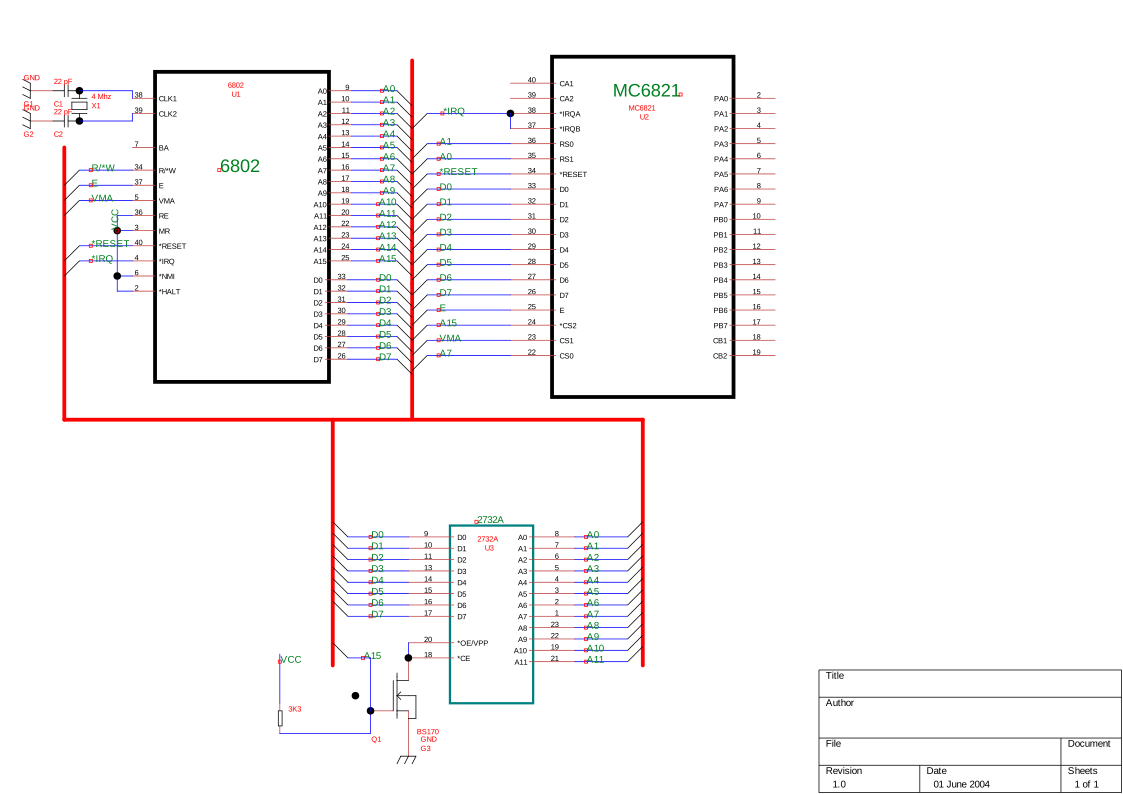
Bus workflow
- Draw the bus line where the grouped signals should run.
- Place bus entries where individual signals branch off.
- Draw wires from each bus entry to symbol pins or connection points.
- Place labels on those wires (for example
D0,D1,D2…). - Repeat labels/wires at the destination bus using the same names.
When labels match, those nets are connected.
Bus objects in TinyCAD
- Bus: main grouped path; useful for organizing many connections.
- Bus Entry: visual entry/exit from the bus to a single wire.
- Bus Name: text across a bus (for example
Data Busor conductor count).
Bus names describe intent for humans; labels on wires carry electrical net identity for tools.
Naming and repeat tips
- Keep bus signal labels consistent end-to-end (
A0..A15,D0..D7, etc.). - Use repeat options to speed up entry placement and sequential labels.
- The order of signal names can differ at each end as long as names match.
Junctions
Buses do not require junction dots on the bus line itself.
Buses and multi-sheet drawings
Across sheets, reuse the same signal labels to connect corresponding nets. Bus graphics and names help readability, while label names define connectivity for netlisting/DRC.
- Back to Drawing
- Back to v4 contents